family history

The $75 Poodle Takes the Night Off

On 25 July 1893, the New York World published an article entitled “Where was the $75 poodle?”

The article is about a burglary that week at the saloon of Walter Noteboom, my 3rd great-grandfather.  The article states:

Burglars Robbed His Master in Park Row and He Did Not Object

When Walter Noteboom, who keeps a saloon at No. 143 Park Row, returned from Germany about four months agao he brought a poodle dog for which he had paid $75.  The poodle in Germany had enjoyed the reputation of being an excellent watch-dog.  Since his arrival in this country the poodle has slept at night in Mr. Noteboom’s saloon.

Somehow or other the poodle must have had a night off on Sunday, because burglars entered Mr. Noteboom’s place before midnight, or early Monday morning, and stole $5 in cash, seventeen boxes of cigars, some clothing and several bottle of brandy.  The burglars passed through the hallway of No. 265 William street and scaled a seven-feet fence.  Then they forced the door of the kitchen at No. 143 Park Row and cut a panel through the door leading into the barroom.

Now, one has to wonder how a burglary and a poodle made the news in 1893… At that time, Park Row was also known as Newspaper Row.  The New York World Building was located at 53-63 Park Row, just down the street from Walter Noteboom’s bar.  Maybe the editor or journalist who wrote this piece (there is no byline) was a regular patron of the bar.  Much of this area has been razed, with the New York World Building being demolished in 1955 to make way for a car onramp for the Brooklyn Bridge.  What is left of Park Row is closed to car traffic today, due to its proximity to One Police Plaza and New York’s City Hall.

Hederina Harms de Weerdt Death Certificate

Hederina Harms de Weerdt is my 4th great-grandmother, the wife of Wolter Noteboom, and the mother of Walter Noteboom.  She died on 28 November 1884 in Winschoten, Groningen, Netherlands.

Hederina Harms de Weert - Death Certificate

Hederina Harms de Weert – Death Certificate, Groninger Archieven


In the year one thousand eight hundred eighty-four, the twenty-eighth day of the month of November, before our Chief of the civil registration of the municipality of Winschoten, Groningen province, appeared Hendrik Kornelis Wildeman, aged forty-two years a professional bargemaster, residing in Winschoten, no blood or marriage of the deceased, and Genk Heikens, aged thirty years a professional carpenter residing in Winschoten, no blood or marriage of the deceased, who have declared, that on the twenty-eighth day of November, in the year one thousand eight hundred and eighty four, between noon and five o’clock, within this municipality is deceased Henderina Harms de Weerdt, seventy-seven years of no occupation, born in Emden, Germany, having recently lived in Winschoten, widow of Wolter Noteboom.


So I had my ancestry DNA tested

I decided to have my DNA tested through AncestryDNA.  I ultimately decided to go with AncestryDNA because of the ability to find common ancestors with other people who have had their DNA tested.

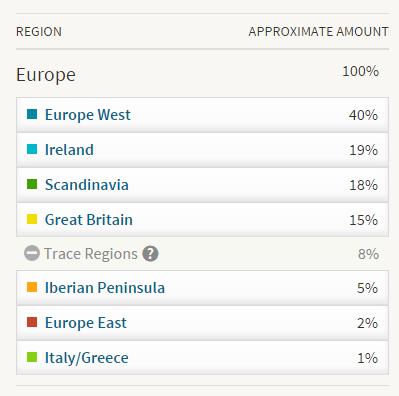
One of the first thing you see when the DNA test results come back is your ethnic breakdown.  Now, from what I’ve read this is based on DNA testing of people who live in those regions now – so there is some margin of error for using this test to confirm my ethnic mix.  And there were a few surprises….

Larisa DNA Ethnicity

Larisa DNA Ethnicity

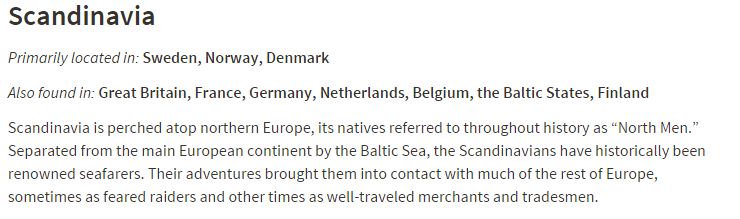
West Europe, Ireland and Great Britain are no surprise at all.  Much of my records research supports family roots in those regions.  The Scandinavian was a complete surprise.  As far as I know, there is not confirmed family ancestry from the Scandinavian region.  However, when you click on the link for Scandinavia, there is more information that may explain why I’m seeing it show up in my profile.

Larisa Scandinavia

Larisa Scandinavia

Netherlands and seafarers….  On my father’s side of the family, my Noteboom ancestors were all seafarers from the Northeastern part of the Netherlands (on the border of Germany, near the major port town of Bremen).  It’s quite possible that farther back in our ancestry than I have traced, our Dutch roots stretch to Scandinavia.  The other explanation (and one my brothers would probably enjoy) is that we have Viking roots!  (I joke…. sort of.)

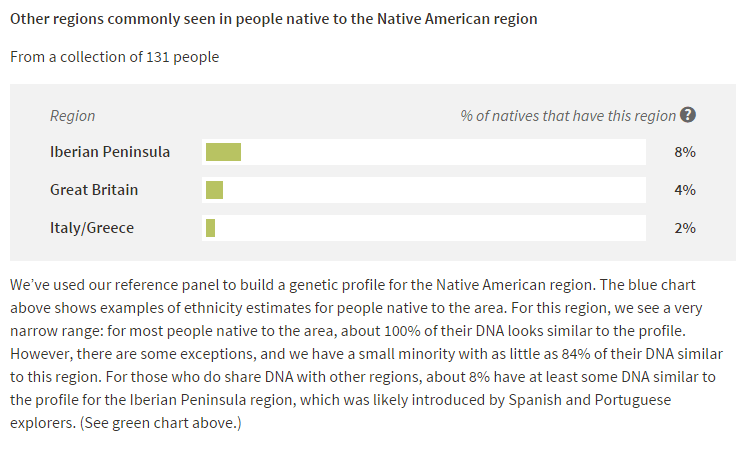
The other big surprise is the mix of Iberian, Eastern Europe and Italy/Greece roots.  But this could possibly explain the other surprise, which was the absence of Native American ancestry (as in 0%).  Now in reading about Native American ancestry in DNA, if the ancestry is far enough back, there may not be enough DNA to register the ethnicity.  And the ancestor I believe to be our Native American connection is my 3rd Great-Grandmother, and assuming she was 100% Native American (which is not confirmed), that means I only have 3.125% of her DNA.  If she was less than 100% Native American, then my share of her DNA is even smaller.

But how does that explain the Iberian/Eastern Europe/Italy/Greece DNA?  Those ethnicities also tend to show up in people whose DNA has Native American ancestry.

Larisa Native American

Larisa Native American

So maybe the Native American DNA is too diluted to register, and/or it’s registering as the other European ethnicities that influenced Native American ancestry.

The thing I’m most excited about is the possible matches to others with trees on Ancestry.com. I’m hoping that I will be able to connect to people who have more information about certain branches of my family tree, so that I can break down those brick walls.  There are some familiar faces – people I’ve already connected with through my research.  It’s nice to have those familial connections confirmed.  I’m looking forward to exploring this new option for researching my family history.

How to… Get Organized with Researching My Family Tree

I’ve been away for a little while – been incredibly busy with a major work project, which included a lot of hours and travel.  Left me too exhausted and with too little time to spend on researching my family tree.  However, in May, I came across a blog post that inspired me to spend some time organizing.  Michele Simmons Lewis on her blog Ancestoring describes an Excel trick for working with the data in her Ancestry.com family tree.  At the end, it produces a spreadsheet with a list of all your ancestors, along with their birth and death dates/places.  Part of the beauty of the list is the list of names will contain a hyperlink to the individual profiles on Ancestry.com.  Here’s an example of what my list looks like:


My Family List in Excel

My Family List in Excel


Then I took the spreadsheet a few steps further – in part because I’m a complete Excel geek and because I like to use data to solve problems.  My next step, I added some extra columns:

Columns in My Spreadsheet

Columns in My Spreadsheet


  • Relationship (to me)
  • Side of the Family (Maternal, Paternal and N/A).  N/A is for my siblings, their spouses, children, etc. who don’t belong to actually one side of the family or the other.
  • Copies of Citations/Docs Downloaded.  (I’ll get more into this below.)
  • File location (for the MRIN/Marriage Record Identification Number, which I use for organizing my computer file folders)

In addition to the columns, I do a couple of other things to the data to make it easier to work with:

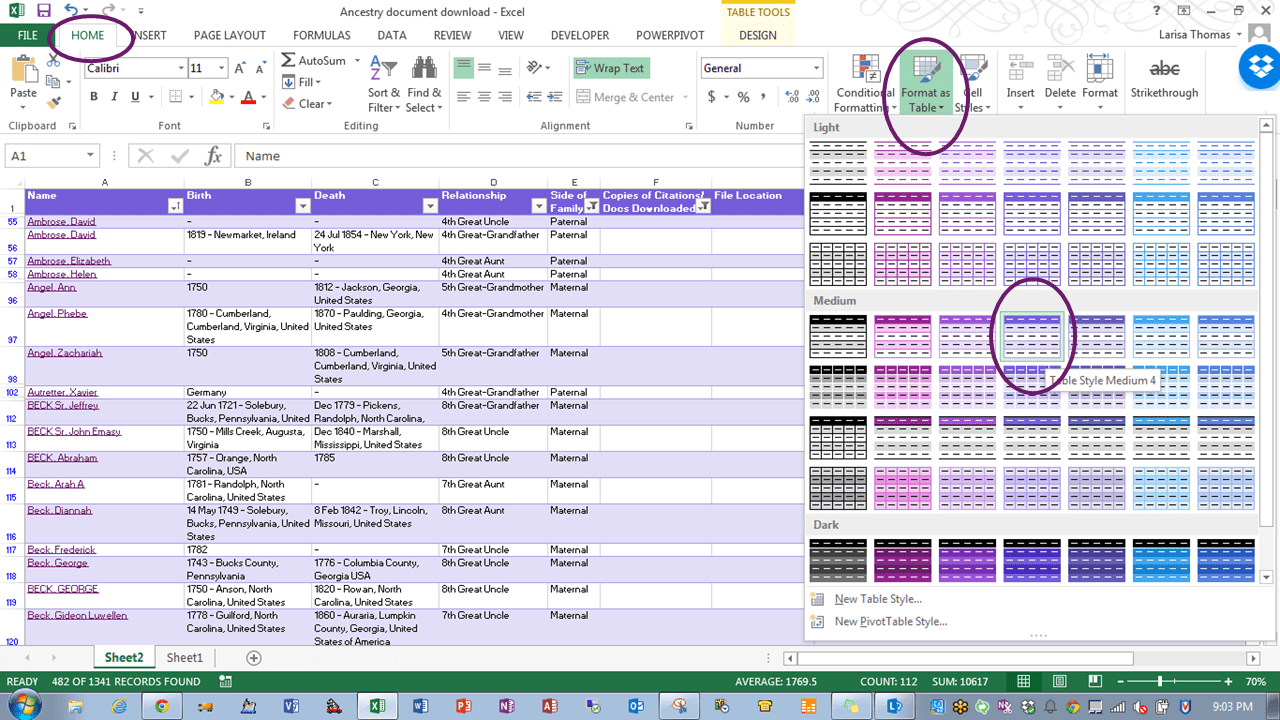
  1. Create a table for the range of data.  Excel behaves differently when working with data within a table that makes it easier to work with, especially when the data is very similar and when working with formulas.  To do this, highlight all the rows and columns of data in the spreadsheet.   On the Home tab, select Format as Table, then select the table format that you want/like.  I prefer a table that has alternating colors for the lines because I find that easier to read.
Formatting a Table

Formatting a Table

  1. Then I add a Filter to the column headers.  Highlight the row of headers, and select Filter on the Data tab.  Once the filter is set, you can click on any of the down arrows next to a column header to:
  • Sort by that column
  • Filter by certain data, such as a surname, and hide all the other rows of data.
Filters in Excel

Filters in Excel

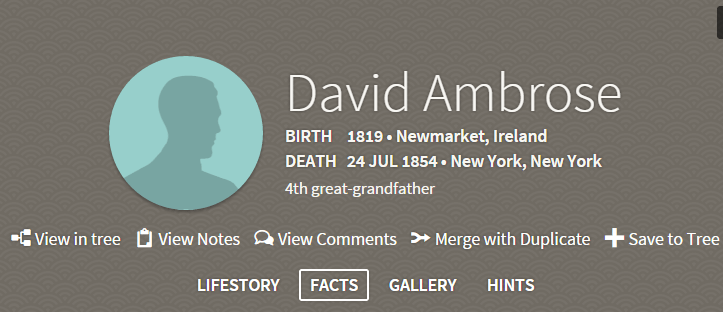
Once I had the data formatted the way I wanted it, I was ready to get to work.  Using the hyperlinked name for each member of my family tree, I noted their relationship to me (concentrating only on direct ancestors and their siblings – I bypassed any cousins x times removed) and what side of the family they fell on.  This is easy in the Ancestry.com individual profile, as the relationship is noted in the header information.

Ancestry Profile Header

Ancestry Profile Header

But the main purpose of this list is to keep track of downloading copies of the records attached to my ancestors’ profiles to my computer to retain my own digital copy of all their records.  I’m still working my way through this, but I’ve got a good head start.  Once I’ve download the attached records of a particular profile, I mark the row as “Complete” under the column: Copies of Citations/Docs Downloaded.  I also save a .pdf of the citation page from Ancestry.com for each record, including any index citations, in the ancestor profile.  I then put the path for the file folder on my computer in the last column so that I know where to find these files later.

Download and File Location Columns

Download and File Location Columns

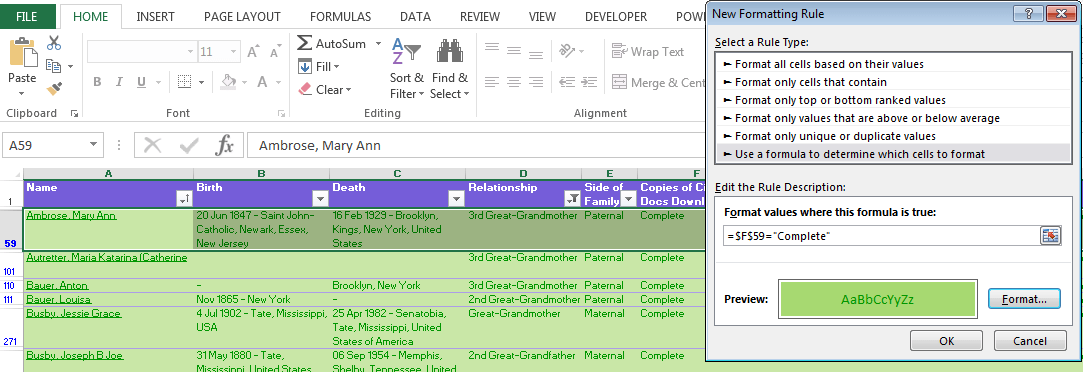
The next trick I use in Excel is Conditional Formatting.  Whenever I enter the word “Complete” in the Download column, it will highlight the row in green so I can easily see which ancestors I’ve completed downloading the documents for.  If the ancestor doesn’t have any source citations in their profile, I mark the column as “None”.  Any marked with “None” get highlighted in red.

Conditional Formatting

Conditional Formatting

To use Conditional Formatting to highlight a whole row, based on the contents of a single cell:

  • Highlight the row of data.
  • Select Conditional Formatting from the Home tab.
  • Select New Rule
  • In the New Formatting Rule dialog box, select “Use a formula to determine which cells to format”.
  • Enter the formula entering an equal sign, click on the cell that will contain the data you want to base the formatting on.  In this case, I select the cell F59 for the Download column for row 59.  This is where I will note “Complete” or “None”.  Enter another equal sign, then the text (in quotes) that you will base the formatting on, in this case, “Complete”.
  • Click on the Format… button to select the formatting you want applied to the row, such as fill, font color and border.
  • Click OK.
  • Repeat the process for “None”.
  • Click OK to exit out of the Conditional Formatting dialog box.
Conditional Formatting Rules

Conditional Formatting Rules

  • Select the Format Painter tool and copy the formatting to all rows in the spreadsheet.
Format Painter Tool

Format Painter Tool

Now that the spreadsheet is formatted the way I wanted, I worked my way through my family tree, surname by surname, noting the relationship and side of the family.

Now I can easily produce to do lists for research and downloading records for parts of my family tree by filtering the list based on surname, relationship type, side of the family, etc., depending on what part of my family tree I want to concentrate on.

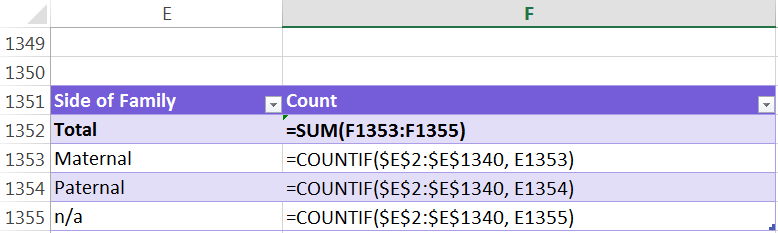
And in the habit of playing with data, I also created some fun tables of summary information at the bottom of my spreadsheet, using some easy Countif formulas:

Counts by Side of the Family:

Count by Side of the Family

Count by Side of the Family

For example, to count the Maternal line, the formula is =countif(Range of Data, Cell with the word Maternal in it).  The formula will count all cells that contain the matching word from the data table.

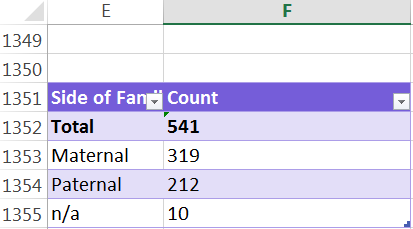
Count by Side of Family Results

Count by Side of Family Results


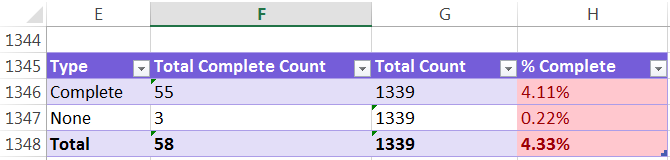
Count by Complete Downloads

Count by Complete Download

Count by Complete Download

For example, to count the Complete Download, the formula is =countif(Range of Data, “Complete”).  The formula will count all cells that contain the word “Complete” from the data table.  Then count the total number of rows by with the CountA formula, written as: =counta(range of data).  In the last column, divide the Total Complete by the Total Count to get the percentage completed.

Count by Complete Downloads Results

Count by Complete Downloads Results


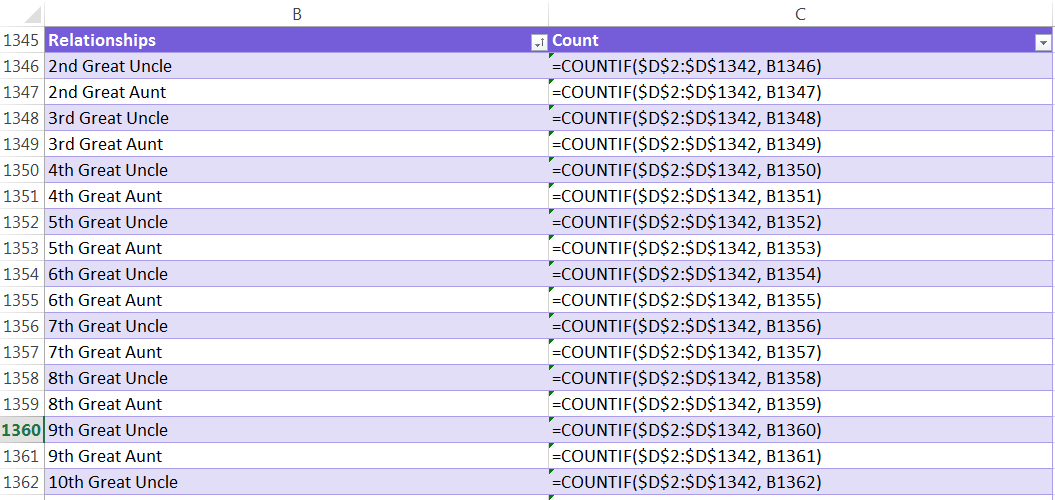
Count by Relationship Type

Count by Relationship Type

Count by Relationship Type

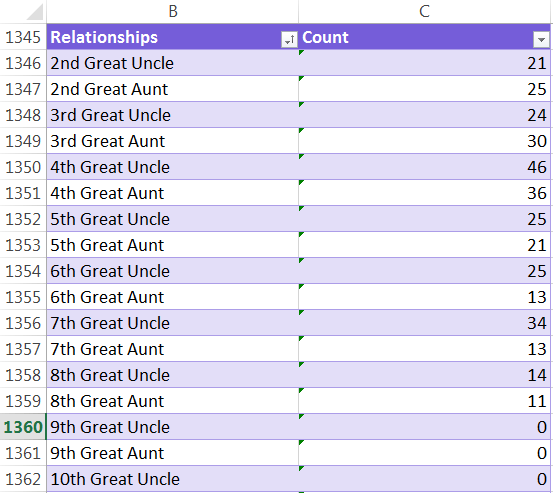
For example, to count the number of 2nd Great Uncles, the formula is =countif(Range of Data, Cell with the phrase “2nd Great Uncle” in it).  The formula will count all cells that contain the matching phrase from the data table.

Count by Relationship Type Results

Count by Relationship Type Results

A note about the “$” in some of the formulas: this hard codes the cell referenced in the formula, so that if you drag the formula down to copy it to additional cells, that part of the formula remains constant and only the non-$ numbers adjust.

So many thanks to Michele Simmons Lewis for the inspiration to riff off in order to get organized with my research.

Zion German Evangelical Lutheran Church

Zion German Evangelical Lutheran Church, Brooklyn Heights

Zion German Evangelical Lutheran Church, Brooklyn Heights
By Beyond My Ken (Own work) [GFDL or CC BY-SA 4.0-3.0-2.5-2.0-1.0], via Wikimedia Commons

The Zion German Evangelical Lutheran Church was founded in 1856 and still operates today at 125 Henry Street in Brooklyn Heights, New York.  My 3rd great-grandparents Walter Noteboom and Beta Frederike Christiane Nullmeyer were married there on 11 November 1876.  They were married by the founding pastor, Friedrich W.T. Steimle.

The first church service was held on the first Sunday in Advent in 1855 (December 2nd), with twelve worshipers in attendance.  The service was held in a hall at Nassau and Fulton Streets.  The congregation was comprised of recent German immigrants, who wished to maintain their traditions as Lutheran Christians.  The services were conducted in German.  In the early days, the church was very small, with no more than four worshippers in atttendance.  However, the congregation grew quickly, welcoming the many recent Germans who immigrated to the New York area and necessitating the move to a new home at 189 Washington Street in May 1856. Before the end of the year, the church was incorporated and purchased its permanent home at 125 Henry Street for $14,500.  The Henry Street church was originally built as a Dutch Reform church in 1839, making it the oldest church in Brooklyn Heights that is still being used.1

Pastor Friedrich Wilhelm Tobias Steimle was born in 1827 in Wurttemberg, Germany, and earned his missionary education in Basel.  He arrived in New York in January 1851, and served as an assistant pastor to Dr. Stohlmann until 1855, when he began the Zion German Evangelical Lutheran Church.  He was licensed by the Ministry of New York, and helped found the German New York Synod for which he served as President for six years.  He passed away on 28 February 1880 at almost 53 years of age.2


  1. Church Marriages“, The German Genealogy Group, http://www.germangenealogygroup.com, Accessed: 2 Feb 2015.
    Nicum, John. Geschichte des Evangelisch – Lutherischen Ministeriums vom Staate New York und Angrenzenden Staaten und Ländern (History of the Evangelical – Lutheran Ministry of the State of New York and Adjacent States and countries), New York: Lutheran Church, New York Ministry, 1888, page 351, digital images, Google Books (https://books.google.com/books?id=eo0sAAAAYAAJ&source=gbs_navlinks_s, Accessed: 2 February 2015). 
  2. Nicum, 375.