Ancestry.com

Isaiah Golden – 1860 US Federal Census, Non-Population Schedules – Industry

1860 US Federal Census, Non-Population Schedules: New York, Westchester, Morrisania, 1 June 1860

Name, Business/Product/Capital Invested/Raw Materials Used: Quantities-Kinds-Value/Kind of Motive Power/Average Number of Hands Employed: Male-Female/Wages: Average monthly cost of male labor-Average monthly cost of female labor/Annual Product: Quantities-Kinds-Values

GOLDEN, ISAIAH, Cooper, $300 Invested[1], Hoops, $500 Value[2], 2 Male Laborers, $40[3] Cost of Labor, 4000 [illegible] Kegs, $1400[4] Value.[5]

Isaiah Golden - 1860 Federal Census-Non-Population

[1] $300 in 1860 is the equivalent of $124,000 in 2016 in Income Value.  https://www.measuringworth.com/uscompare/

[2] $500 in 1860 is the equivalent of $207,000 in 2016 in Income Value.

[3] $40 in labor cost in 1860 is the equivalent of $16,600 in 2016 in labor value for skilled labor.

[4] $1400 in 1860 is the equivalent of $579,000 in 2016 in Income Value.

[5] 1860 US Census, Non-Population Schedule: New York, Westchester, Morrisania , Archive Collection Number: I5; Roll: 80; Page: 12; Line: 19; Schedule Type: Industry, Image 448, (Ancestry Operations, Inc., 2010)

Isaiah Golden and Mary Code – 1860 US Federal Census

In the 1860 US Census, Isaiah and Mary were living in Williamsburgh, New York.  Isaiah’s worked as a cooper and his personal estate was valued at $200.[1]  In the house, there were two children.  Emma was the older daughter, age 13, and had attended school.  The younger of the children was the son Isaiah, age 9, who had also attended school.[2]   Given the age difference between Emma and Mary, it’s highly unlikely that Mary was Emma’s mother, as that Mary would have given birth to Emma at age 11.  So it is presumed that based on this record, Isaiah had a first wife, whose identity remains unknown at this time, and that both Emma and Isaiah are children of that first wife.

Isaiah Golden 1860 Census

Transcript:

1860 US Federal Census: New York, Kings, Brooklyn, Williamsburgh, 1st District, 14th Ward, 10 July 1860, Dwelling No. 489, Family No. 1152:

GOLDEN, ISAAH [ISAIAH], Age 33, Male, Cooper, Personal Estate Value: $200, Born New York;

GOLDEN, MARY A., Age 24, Female, Born New York;

GOLDEN, EMMA, Age 13, Female, Born New York;

GOLDEN, ISAAH [ISAIAH], Age 9, Male, Born New York.

[1] $200 in 1860 is the equivalent of $82,700 in income value in 2017.  https://www.measuringworth.com/uscompare/relativevalue.php

[2] 1860 US Federal Census: New York, Kings, Williamsburgh, Roll M653_773, Page: 129, Image 129, (Ancestry.com Operations, Inc. 2009.

Update for My Genealogy Do Over

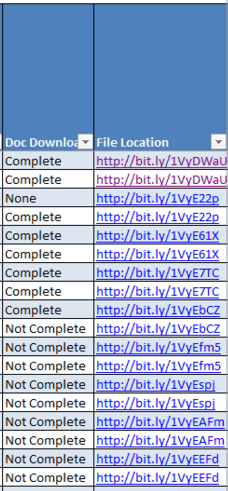
I’ve been working with my Genealogy Source Checklist (see previous post here). I’ve made a couple of modifications, and actually combined it with my Ancestry Document Download spreadsheet (see previous post here).  To combine them, I added a column for tracking if I had downloaded all the documents from my Ancestry account for that ancestor, along with a column for linking to the file location where those files are saved.

As an aside: I save all my computer files to a Dropbox account and for the spreadsheet, I went to the web interface and used the URL for the file location for the ancestor in question.  I actually used a bit.ly short url for the spreadsheet so that I didn’t have long, messy links in my file.

Excel

Excel

As I worked on my checklist here are some additional changes that I’ve made:

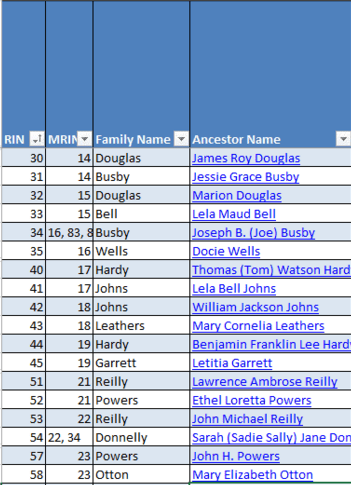
I added a hyperlink to each ancestor name that points to the Ancestry profile page for them in my tree.  To add a hyperlink, highlight the cell > right-click and select “Hyperlink”.  Copy and paste the URL of the Ancestry profile page into the dialog box and click OK.

Excel

Excel


I added a column for the surname.  This allows me to sort by the surname if I want to work on a particular family line.  For family members who I don’t have a surname (mostly wives whose maiden names are unknown), I put in the surname of the husband, so I can keep track of those people along with the rest of their family group.

Excel

Excel


I also added a column for tracking if I’ve completed downloading the documents for that ancestor.  I use three options: Complete, Not Complete and None.

Excel

Excel


And as I’m working through downloading the documents from Ancestry, I’m also using that opportunity to clean up my online family tree.  I removed a whole bunch of disconnected who are no longer connected to my family tree as I had eliminated them as being a part of my family.  I also decided to trim down who I include in my collateral relatives.  I realized when I was looking at the profile page for the “maternal grandfather of the mother-in-law of the husband of my great aunt” that I really didn’t want to spend the time tracking, researching and organizing for that distant a relation, who is only related through marriage.  I decided to draw the following line:

  1. I will include all siblings of direct ancestors.
  2. I will include spouses and children of all siblings of direct ancestors.
  3. I will include parents and siblings of spouses of siblings of direct ancestors (because this may be useful for cluster research).

In the end, I ended up with 1130 people in my current tree – which is still a fairly good number of people to research, track and organize!  672 of them are on my maternal side, 444 are on my paternal side and 14 are what I termed as immediate family.

I’ve updated the available templates here (though if you are already using the spreadsheet, just add the following columns:

  1. Family Name
  2. Doc Download (Complete, Not Complete, None)
  3. File Location

Genealogy Research Checklist

There are lots of different genealogy checklists available out there for tracking whether or not you’ve located a particular record for any given ancestor.  I was looking for one because I wanted to reorganize my genealogy research.  I’m peripherally following what’s going on with the Genealogy Do Over/Go Over that  many are participating in, but I’m fairly busy with my day job right now, so I’m only planning on completing just the first part of the project – categorizing what I’ve already collected in a spreadsheet and making sure I have copies of all digital records saved according to my filing system.  I’m actually going to actively try to restrain myself from going down the rabbit hole of additional research until I have everything cataloged and filed properly (best laid plans – I don’t know how successful I’m going to be because it’s the research part that’s irresistible and how I ended up in this disorganized mess.)

Most of the ones I’ve found are primarily word or .pdf versions that are one-sheet per ancestor.  But as a lover of data and a fiend for using Excel for anything I can, I’ve adapted my own genealogical research checklist.  I wanted to share it here, with a quick guide on how I choose to use it.

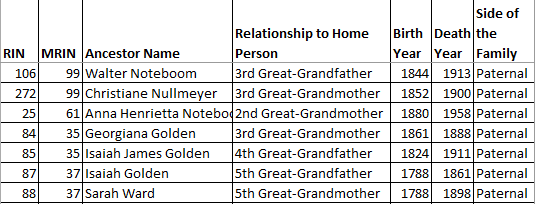
First, I designed it in mind using the MRIN-method of filing ancestor information that I learned in a class I took with Karen Clifford.  So each line item on the spreadsheet uses a combination of the MRIN of the marriage and the RIN of the individual for tracking the information.  In addition to the Ancestor Name, I also include the relationship to the “Home” person, in this case me, and what side of the family they fall on.  If I am tracking the records for my husband’s family, he would be the home person whose relationship I would be tracking.  I also include the years of birth and death, if known, to aid in searching.

Genealogy Checklist

Ancestor Information for each line item of the checklist

I have 13 sections (highlighted in alternating colors for visibility):

  • Vital/Church Records
    • Birth
    • Christening/Baptism
    • Confirmation
    • Marriage
    • Divorce
    • Adoption
    • Death
    • Burial
    • Ordination
    • Membership List/Directory
    • Church Histories
  • US Census Records: 1790 to 1940
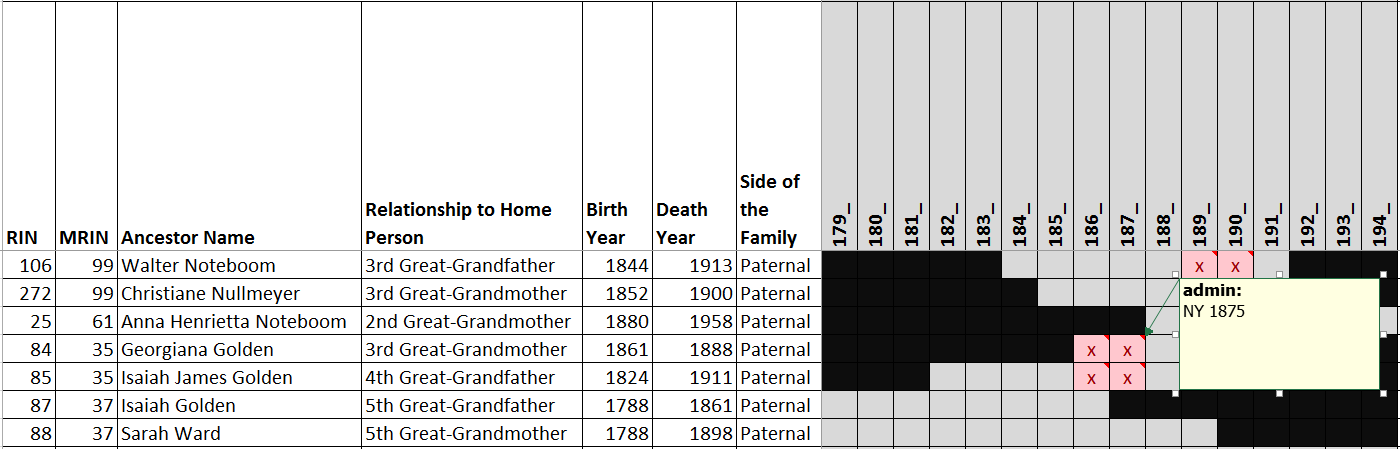
  • State Census Records: 179_ to 194_
    • State Census years vary by state, so the last digit is left blank so as to be applicable to any state census
  • Land Records
    • Grantee Index
    • Grantor Index
    • Deeds
    • Abstracts
    • Mortgage/Promissory Notes
    • Surveys/Plats
  • Tax Records
    • Poll Tax
    • Real Estate Tax
    • Personal Property Tax
  • Burial Records
    • Tombstones/Monuments/Memorials
    • Cemetery Plats
    • Perpetual Care
  • Probate Records
    • Indexes
    • Wills
    • Administrator/Executor
    • Estate Inventories
    • Obituaries
    • Bonds
    • Settlements
    • Guardianships
  • Immigration Records
    • Passenger Lists
    • Emmigration List
    • Passports
    • Border Crossings
    • Alien Registration Cards
    • Naturalization/Citizenship Records
  • Military Records
    • Draft Cards
    • Enlistment Records
    • Service Records
    • Payroll Records
    • Muster Rolls
    • Discharge Records
    • Pension/Veteran Records
  • Personal & Miscellaneous Other Records
    • Family Bible
    • Account/ Bank Books / Statements
    • Appointment Calendars
    • Awards & Citations
    • Baby Books
    • Bills of Sale
    • Calling Cards
    • City Directories
    • Diaries & Journals
    • Employment Records
    • Family Histories
    • Greeting Cards & Letters
    • Insurance Policies
    • Medical Records
    • Memoirs
    • Oral Histories/ Interviews
    • Organizational Memberships
    • Photographs/ Scrap books
    • Postcards
    • Recipe Files
    • School Records
    • Telegrams
    • Yearbooks
  • Publications/Societies
    • GenealogyBank.com
    • Chronicling America
    • Newspapers.com
    • Other Newspaper Archives
    • PERSI
    • Genealogical Societies
    • Historical Societies
    • Secret Societies/Clubs
  • Book Sources
    • WorldCat
    • Local Library
    • California State Library
  • Repositories and Databases
    • NARA
    • FamilySearch
    • Ancestry
    • FindMyPast
    • My Heritage
    • Google
Genealogy Checklist

Categories & Document Types in Records Checklist


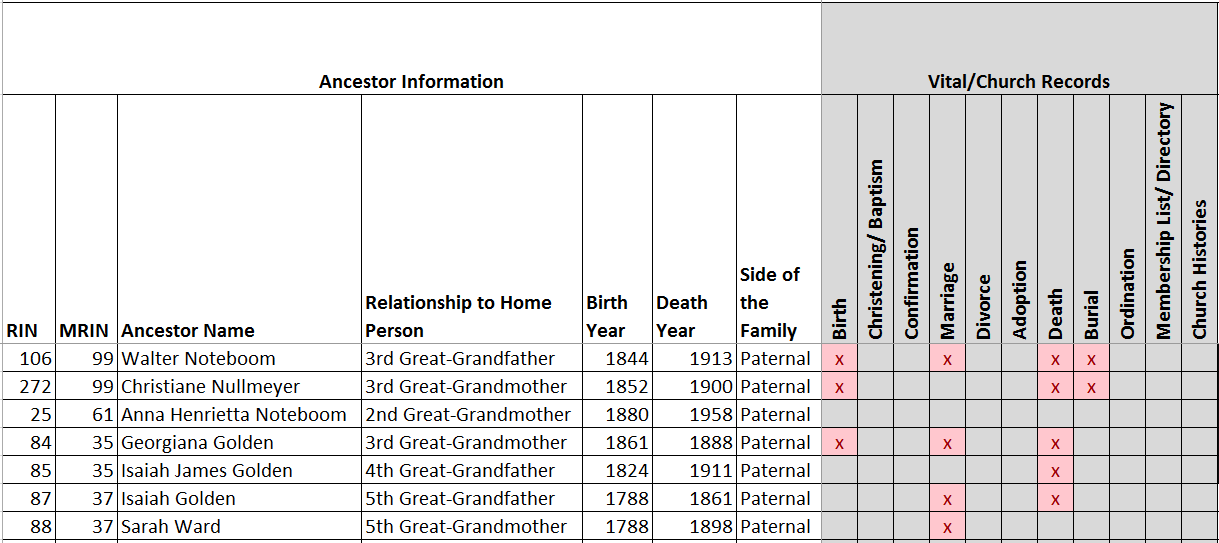
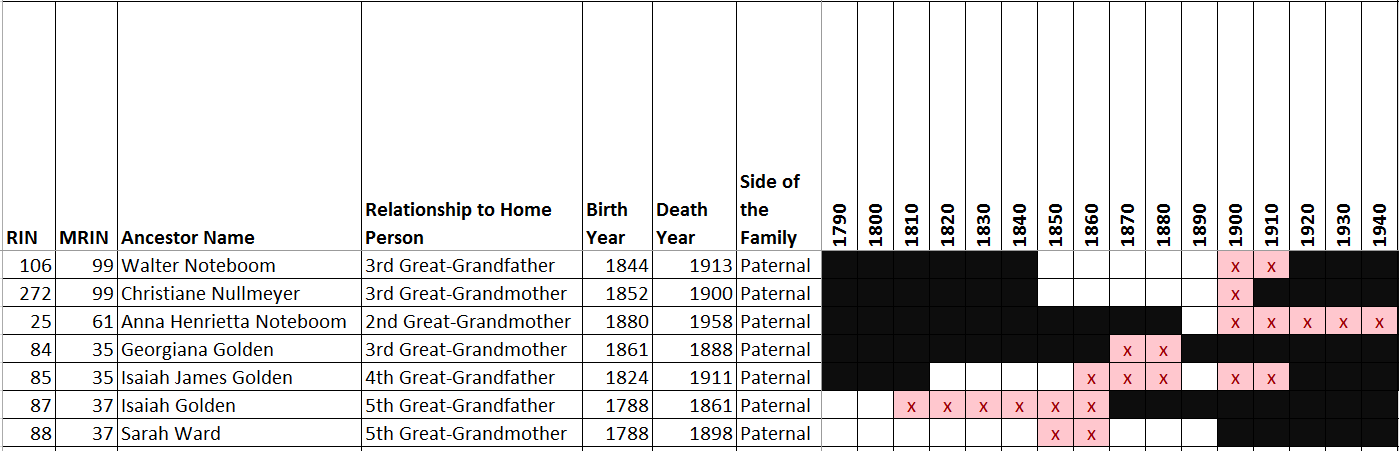
As I research my ancestors, I want to tick-off what types of documents I’ve found for each person.  To make missing documents more easily stand out, I use conditional formatting.  Every time I enter an “X” into the record box, it is automatically highlighted in red:

Genealogy Checklist

Red highlights with conditionally formatting

I also do two things for census records.  For the US Census decades, I fill in cells that are not applicable in black to make it clear that they are not missing.  For the State Censuses, I add a comment to the cell with the state name and exact year of the census identified:

Genealogy Checklist

For the years of the US Census that are not applicable to the particular ancestor, the cells are blacked out.


Genealogy Checklist

For state censuses, I also add a comment with the state name and exact year.


I also use filters in the table to allow me to search for a particular record across multiple ancestors.  For example, if I want to search for the 1880 US Census for everyone that is missing it, I can select the filter to show all “blanks”.  Alternatively, I can filter by color, to show all cells that have “no fill”.

Genealogy Checklist

Filtering by a particular column will help me narrow down which ancestors are still missing that record.


You can download a copy of this Excel checklist, with all the formatting features here.

So I had my ancestry DNA tested

I decided to have my DNA tested through AncestryDNA.  I ultimately decided to go with AncestryDNA because of the ability to find common ancestors with other people who have had their DNA tested.

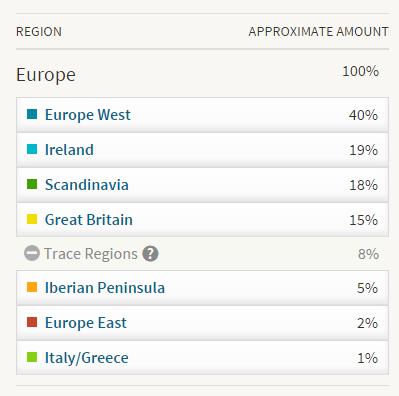
One of the first thing you see when the DNA test results come back is your ethnic breakdown.  Now, from what I’ve read this is based on DNA testing of people who live in those regions now – so there is some margin of error for using this test to confirm my ethnic mix.  And there were a few surprises….

Larisa DNA Ethnicity

Larisa DNA Ethnicity

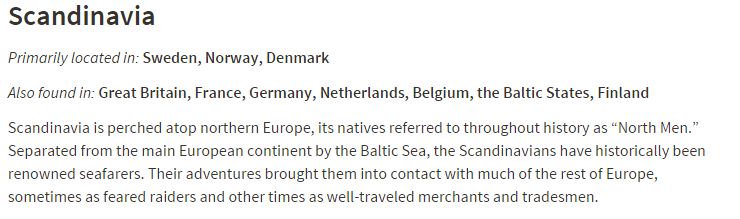
West Europe, Ireland and Great Britain are no surprise at all.  Much of my records research supports family roots in those regions.  The Scandinavian was a complete surprise.  As far as I know, there is not confirmed family ancestry from the Scandinavian region.  However, when you click on the link for Scandinavia, there is more information that may explain why I’m seeing it show up in my profile.

Larisa Scandinavia

Larisa Scandinavia

Netherlands and seafarers….  On my father’s side of the family, my Noteboom ancestors were all seafarers from the Northeastern part of the Netherlands (on the border of Germany, near the major port town of Bremen).  It’s quite possible that farther back in our ancestry than I have traced, our Dutch roots stretch to Scandinavia.  The other explanation (and one my brothers would probably enjoy) is that we have Viking roots!  (I joke…. sort of.)

The other big surprise is the mix of Iberian, Eastern Europe and Italy/Greece roots.  But this could possibly explain the other surprise, which was the absence of Native American ancestry (as in 0%).  Now in reading about Native American ancestry in DNA, if the ancestry is far enough back, there may not be enough DNA to register the ethnicity.  And the ancestor I believe to be our Native American connection is my 3rd Great-Grandmother, and assuming she was 100% Native American (which is not confirmed), that means I only have 3.125% of her DNA.  If she was less than 100% Native American, then my share of her DNA is even smaller.

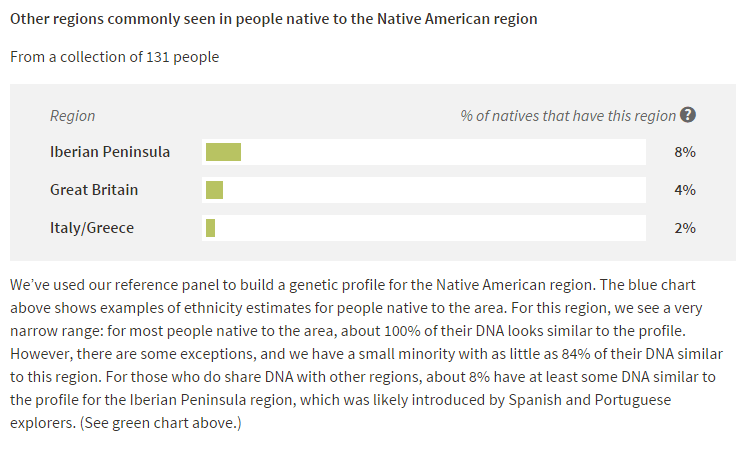
But how does that explain the Iberian/Eastern Europe/Italy/Greece DNA?  Those ethnicities also tend to show up in people whose DNA has Native American ancestry.

Larisa Native American

Larisa Native American

So maybe the Native American DNA is too diluted to register, and/or it’s registering as the other European ethnicities that influenced Native American ancestry.

The thing I’m most excited about is the possible matches to others with trees on Ancestry.com. I’m hoping that I will be able to connect to people who have more information about certain branches of my family tree, so that I can break down those brick walls.  There are some familiar faces – people I’ve already connected with through my research.  It’s nice to have those familial connections confirmed.  I’m looking forward to exploring this new option for researching my family history.